This site is a work in progress, still shipping new things every week
Vortex
Transforms your browser into an infinite spatial canvas where websites live as interactive nodes. Instead of 100+ messy tabs, every link spawns a new node, mapping your journey visually. Inspired by Figma.
React 18ViteChrome ExtensionManifest V3TypeScript
Visit Live Project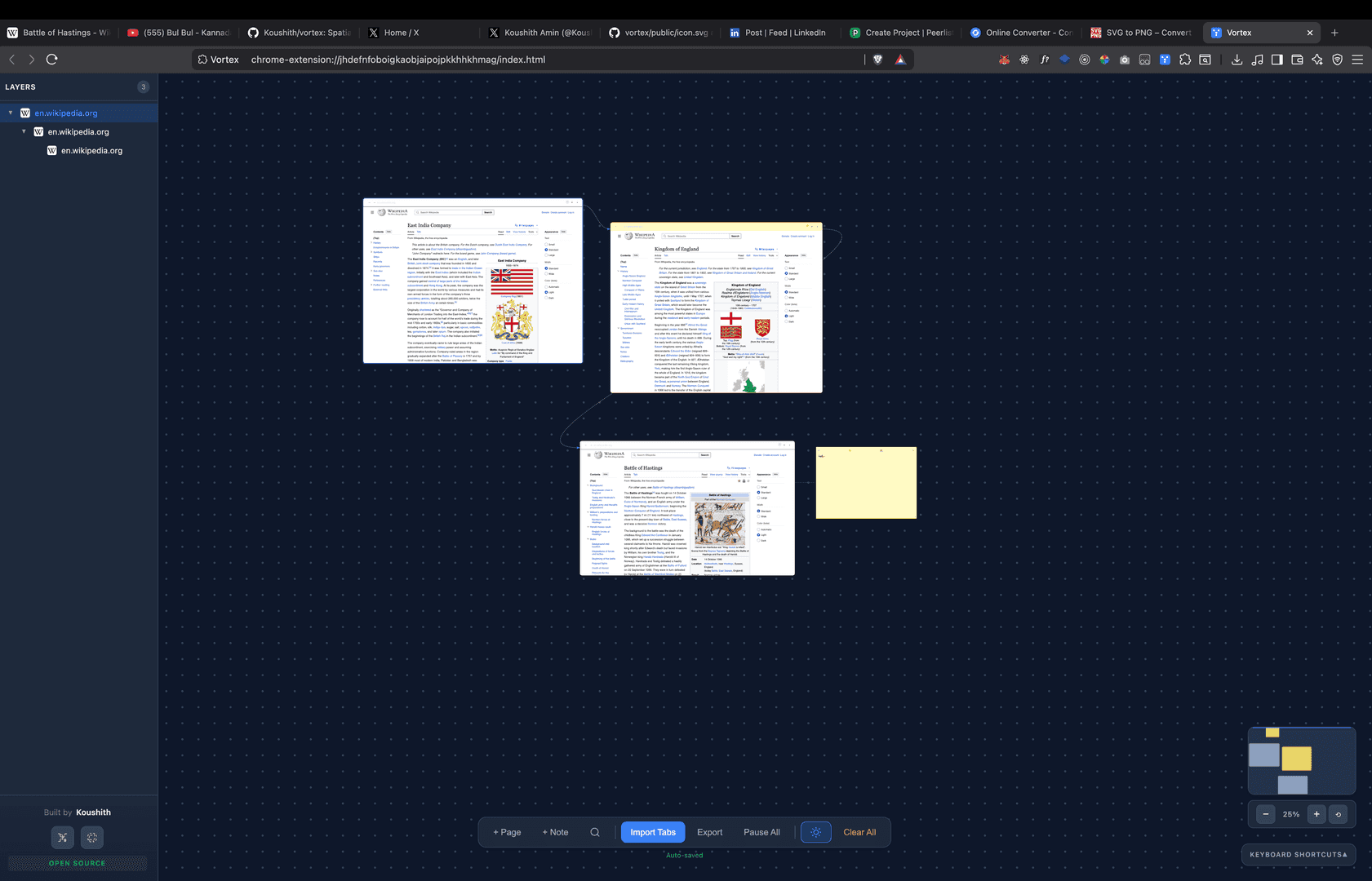
About the project
Vortex transforms your browser into an infinite spatial canvas where websites live as interactive nodes. Instead of juggling dozens of tabs, arrange your research visually, see connections between pages, and maintain context while exploring the web. Every link you click spawns a new node, mapping your journey visually. Inspired by Figma canvas and prototype view.
Key Features:
• Infinite Canvas: Pan and zoom freely across your workspace
• Visual Browsing: Websites appear as interactive, resizable nodes
• Smart Connections: Links auto-connect to show your research path
• Sticky Notes: Attach notes to nodes that move together
• Color Coding: Organize your workspace with 7 color options
• Layer Panel: Figma-style sidebar showing all pages
• Minimap: Navigate large workspaces easily
• Dark Mode: Easy on the eyes
• Auto-Save: Your workspace persists automatically
• Figma Shortcuts: Same shortcuts as Figma (⌘K quick add, ⌘F search, ⌘D duplicate)
How to use: Click the Vortex icon in your browser toolbar, click "Open Canvas" to enter your spatial workspace, use + Page or press ⌘K to add websites, click links inside nodes to open them as connected child nodes, and drag nodes to arrange your workspace.
Story
I had 80+ tabs open researching a single topic and realized I had no idea how any of them connected. Tab managers just add more UI on top of a broken metaphor. Browsing is spatial, but tabs are linear.
So I modeled it as a graph. Every website becomes a draggable node on an infinite canvas. Click a link inside a node and it spawns as a connected child, mapping your research trail visually. The whole thing is inspired by how Figma's prototype view works. You see the flow, not just the pages.
Everything runs client-side. No server, no telemetry, no accounts. Chrome Storage API handles persistence. I borrowed Figma's shortcuts (⌘K, ⌘F, ⌘D) so power users don't have to relearn muscle memory. Added a layer panel, minimap, and color-coding for organizing large workspaces.
Still using it daily for research. It genuinely changed how I browse.
Screenshots
Enlarge

Enlarge

Enlarge

Enlarge
Demo Video
Technology Stack
React 18ViteChrome ExtensionManifest V3TypeScript
Interested in this project?
Check out the live demo or get in touch to learn more.